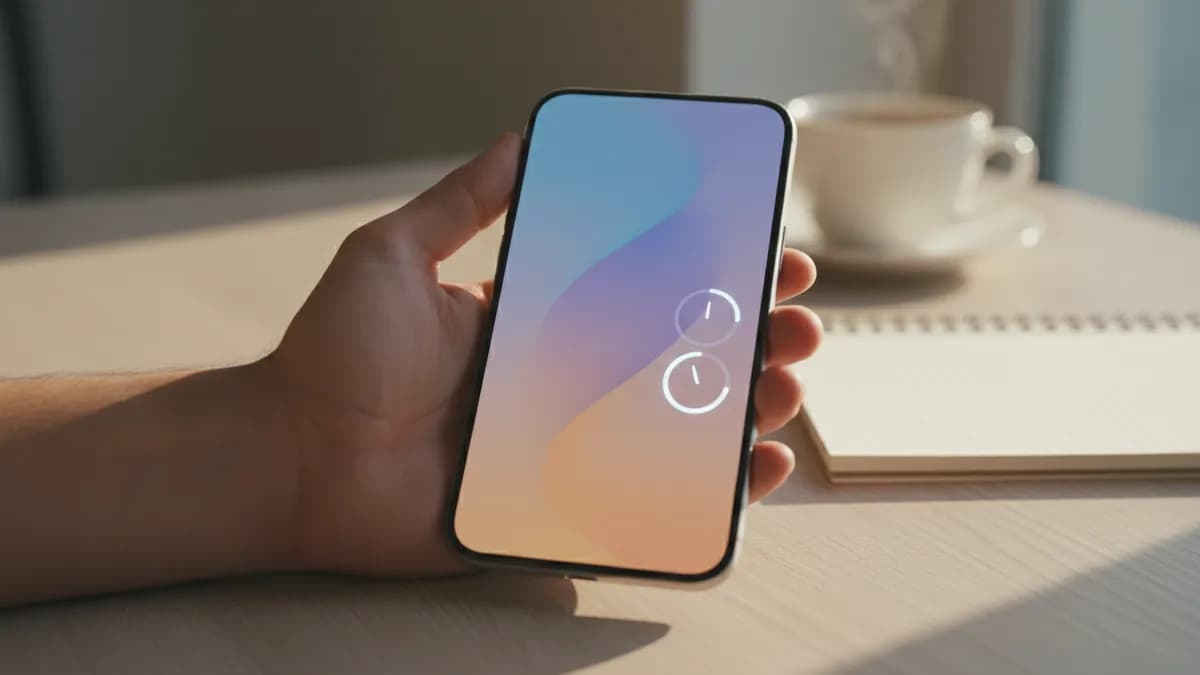
Unconfirmed: Apple Tested a Complication Column for More Widgets on the iPhone Duo Lock Screen
Unconfirmed: According to 9to5Mac and MacRumors, Apple has tested a new Lock Screen layout for the iPhone Duo that would make room for more widgets. The finding comes from a leaker known as pdfu, who digs through Apple's software code. Apple has not announced the feature, and it is switched off in the current software.
What the Complication Column adds
The experimental feature is called the Complication Column. It places a vertical pair of circular widgets along the right edge of the Lock Screen. 9to5Mac reports that these widgets are the same size as the ones that already appear along the bottom of the screen.
The column fills the empty space between two existing parts of the Lock Screen:
- the two customisable controls at the bottom right, which are set to the flashlight and camera by default
- the Wi-Fi and cellular status icons at the top right
MacRumors reports that, according to pdfu, the new column can be used at the same time as the existing row of widgets at the bottom. That would let users see more information without unlocking the phone.
How the Lock Screen works now
On the iPhone Duo's current Lock Screen, users can add widgets along the bottom. The two controls at the bottom right can be linked to other controls from Apple or from third-party apps. Apple has already changed iOS in several ways to suit the iPhone Duo's form factor, and the Lock Screen is one of the parts it has redesigned.
Still disabled, and its future is unclear
According to pdfu, an internal SpringBoard/Ionic setting controls the feature, and that setting is turned off. The column first showed up in iOS 27.1 code. Apple has not changed that code since, so it is not clear whether the company is still working on the feature or has dropped it.
9to5Mac's editor liked the design. He said it could be especially useful on the Lock Screen of the inner display, which he thinks has a lot of unused space. He also said he hopes the feature arrives in a later iOS 27 update. Until Apple confirms its plans, the Complication Column is only an experiment found in code.
This is our own independent analysis and the author's view. Before buying any product, check its specifications, price, warranty and quality yourself. We do not guarantee that the information on this page is 100% accurate or up to date. Read more
Written by
About Johirul Islam


